Superusing (assuming the identity of another agent or team) is a feature that allows members access to other accounts while maintaining a history of who performed listing changes. Superusing allows a member to be signed in on another member’s behalf without the need to share a login, which is against CHSMLS Rules & Regulations.
Watch this brief video to learn how to superuse in FlexMLS.
Essentially, the superuser logs in with their own credentials and then chooses to superuse as another agent. When superused as someone else, the profile button will show the initials of both parties (see image below – the red circled area).
In the following illustration, Melissa Trainer is superusing as Flex Trainer. This means that Melissa has access to view and change everything that Flex does, including saved searches, contacts, and listings.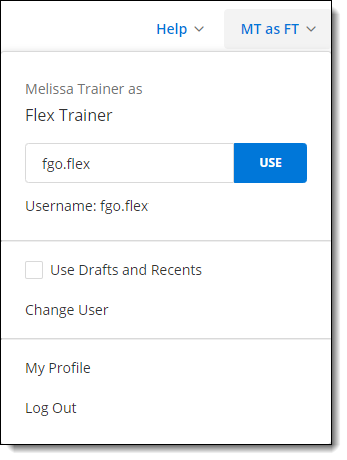
How to Superuse
There are two ways to superuse an identity. You can either enter the username or you use the Change User option.
Entering a Username
When you superuse as another user, you remain logged in as that user until you change to another username (either your own or another member’s). In the above example, if Melissa were to log out of Flexmls while superusing, the next time she logged in, she would still be superusing as Flex.
To change members, type a new username in the text box and click Use, or click the Change User option.
Change User
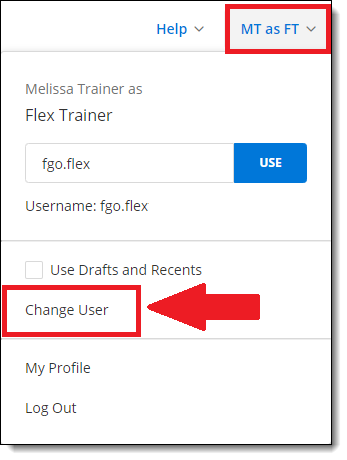
If you’d prefer, you can click on the Change User option (see image below – red arrow). If you choose the Change User option, you will see a list of the members you can superuse (see image to the right). Simply double-click on the member of whom you want to assume the identity. To return to your identity, follow the same process.
To Quit Superusing
In order to quit Superusing, you will need to change back to your identity. If you simply close your browser, when you log back in, you will still be Superusing. You quit Superusing simply by clicking Change User and then selecting the Quit SU-ing button.